Creative projects
Turn the printable everyone asks for into a small Shopify shop
A practical guide to making a useful printable, preparing an honest product page, and testing digital delivery before opening a shop.
In this guide
- How do I start selling a printable through Shopify?
- Begin with one occasion and one useful result
- Let AI help with the gaps
- Show exactly what arrives
- Set up the shop around delivery
- Price the whole job
- Launch with a useful demonstration
- Hire a little help without handing over the whole shop
- Questions you might be asking
- Sources and further reading
How do I start selling a printable through Shopify?
Begin with one printable that helps a specific person on a specific occasion. Check the file, instructions, and usage rights. Explain the format and contents on the product page, then test purchase and digital delivery before promoting the shop.
Maybe it is the holiday planner you made because the store-bought one had no room for your actual family. Or the party checklist your friends keep borrowing. A small digital product can begin with something useful you already know how to make.
The first question is whether someone else can use it successfully without you standing beside them. Answer that before opening a large shop.
Begin with one occasion and one useful result
“Printable planner” leaves a lot to the imagination. “A Thanksgiving hosting kit that helps you plan the menu, shopping, and oven schedule” describes a job.
Choose the person, occasion, and sticking point. Create only the pages needed to get them through it. A short, usable kit is easier to test than a bundle of fifty pages that repeat one another.
Let AI help with the gaps
Use your experience as the starting material. Ask AI to organize it, question it, and identify what a first-time user might misunderstand.
Help me improve a holiday hosting printable for someone planning their first family dinner. Use the checklist I provide. Find missing decisions, confusing instructions, and steps that happen too late. Suggest a clearer sequence. Do not invent recipes, food-safety rules, testimonials, or claims that the kit guarantees a stress-free holiday.
Review every suggestion. Print the pages, write on them, and check whether the text and boxes are comfortable to use. If you include food storage or safety guidance, verify it against appropriate official sources separately.
Show exactly what arrives
Your product page should say how many pages are included, which file types and paper sizes are supplied, whether the files are editable, and how the buyer receives them. Show readable previews using your own work.
Explain any required software and the permitted use. If nothing physical ships, make that unmistakable. Choose a refund policy appropriate to the actual product and business; do not assume a generic AI policy settles the issue.
Set up the shop around delivery
Shopify can support digital products, but the delivery experience needs configuration. Its documentation describes using a digital delivery app and setting the product appropriately so shipping is not applied.
Test the complete journey: purchase, confirmation, access, download, opening the file, and printing. Try a phone too. Make sure the support address works and that customers can find their order information later.
Price the whole job
The product may be digital, but your time is real. Include design, testing, platform and app costs, payment fees, revisions, and support when you evaluate the offer.
For example, a hypothetical $19 kit is not $19 of profit. List the costs and estimate how many orders would cover them. Treat that as a planning exercise, then replace assumptions with actual sales and support time.
Launch with a useful demonstration
Show one page solving one small problem. A short walkthrough of arranging the oven schedule is more informative than a stack of attractive mockups. Invite a few people to try the kit and tell you where they hesitated. Ask permission before quoting their feedback.
Explore Shopify using our affiliate link when you have a product worth testing. A storefront is one possible next step; a clearer, more useful printable is the work that makes the shop worth visiting.
Continue with Wish your planner worked your way? Make a small one with AI.
Hire a little help without handing over the whole shop
If your printable idea is ready but the shop setup is holding you back, consider a bounded project for layout, product-page setup, or a checkout review. List the files you own, what the freelancer will deliver, and how you will edit it afterward. Keep store ownership and payment settings under your control.
Affiliate disclosure: We may earn a commission if you become a qualifying Upwork customer through this link.
Explore hiring on Upwork. Compare relevant work, agree on a small paid milestone, and review the deliverable before expanding the project. Marketplace access does not guarantee a suitable hire or business results.
Questions you might be asking
What should a printable product page explain?
Show what is included, page sizes, file formats, printing or editing needs, usage terms, and delivery steps. Make clear that the purchase is digital when no physical item is shipped. Use a preview that accurately represents the file the buyer receives.
Sources and further reading
- Shopify: Starting a store checklist
- Shopify: Placing a test order
- Shopify: Affiliate program
- Shopify: Selling digital products or services
Sources checked October 19, 2026. Review the linked publisher information for current details.
Put one idea to work
Choose one small change that makes the week calmer or creates room for something you enjoy.
Make a little room to plan →Explore more from Secretly DomesticJoin the Secretly Domestic email list →Keep practicing
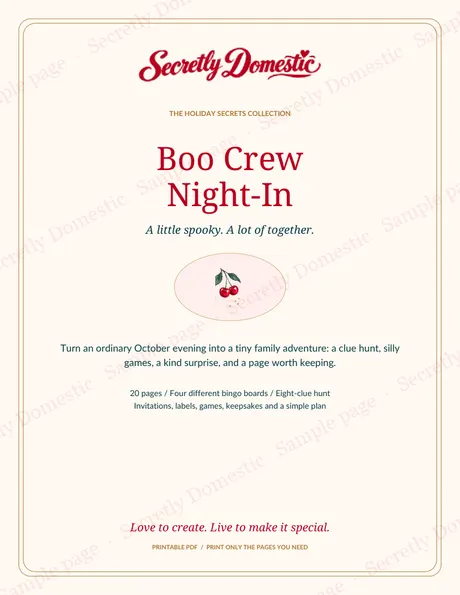 Creative work / Steal my stack
A little creativity, made useful: my printable-product map
Go behind the scenes of Secretly Domestic, one of my seven online brands, and map how a creative idea can become a useful printable for another family.
October 23, 2026 · 5 min read Family Learning
Use AI to Support Your Child’s Learning Without Doing the Thinking for Them
An adult-led approach to AI learning support: better questions, small activities, privacy-conscious prompts and checks that show understanding.
October 22, 2026 · 6 min read